Naad Vault
Some memories come with their own soundtrack
A free and easy-to-use app to help you organize your vinyl records and CDs in one place. Add detailed information about each album, search Discogs directly from the app, and import release metadata to build your own collection in just a few clicks. Your collection stays saved on your computer, with optional Google Drive backup if you want extra peace of mind. Simple, practical, and built for music lovers — and it will always be free.
Downloads: Version 0.0.3 (Alpha)
This application is designed to notify and update when a new version is available.
Naad Vault does not install background services or modify system settings.
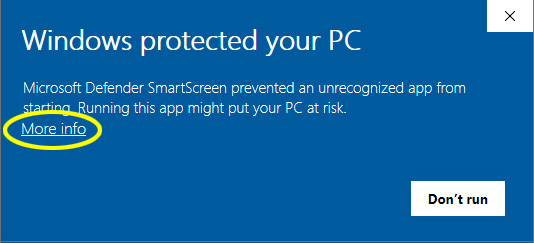
This is an independent, self-hosted project. The app is packaged using free security certificates, so your computer may show a warning during installation. This is normal for smaller apps that aren't signed by large companies.
Please follow the setup steps below to continue the installation without any issues.

Currently limited access available for optional Google Drive backup feature. Request for one.
This is an independent, self-hosted project. The app is packaged using free security certificates, so your computer may show a warning during installation. This is normal for smaller apps that aren't signed by large companies.
Please follow the setup steps below to continue the installation without any issues.
- Double-click the "Naad Vault.PKG" file
- Your Mac may show a warning message. This is normal because the app uses a free security certificate
- Click "Done"

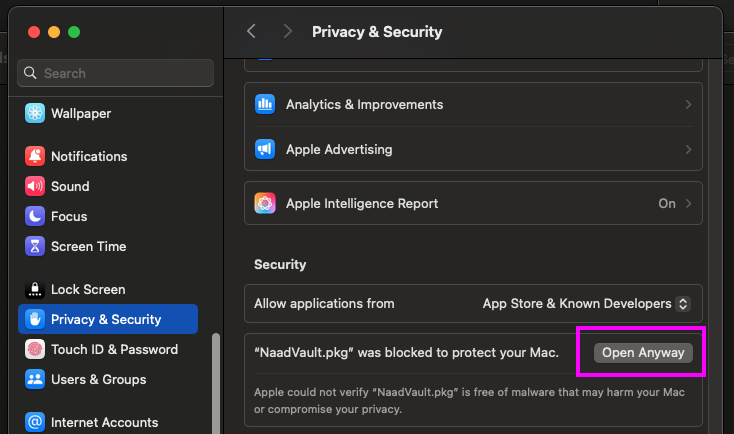
- Open System Settings → Privacy & Security
- In the right panel, scroll to the bottom. You will see an option to open the app along with the same warning message
- Click "Open Anyway"